

Set up phone numbers in FRITZ!Box (from FRITZ!OS 7.10, for residential tariffs)
Manufacturer: Fritz!
Model: FRITZ!Box
Models: 7690, 7590, 7560, 7530, 7490, 7460, 7430, etc.
Firmware: FRITZ!OS 7.10
Important note: These instructions are only for individual phone numbers on residential tariffs.
For business customers, we offer specific guides that explain the setup of phone numbers or a block of numbers (SIP trunking) or devices for the Cloud PBX.
We recommend that you always use the latest firmware. Instructions for older firmware versions can be found at the end of this article.
1. Log in to the FRITZ!Box
Make sure that the FRITZ!Box is connected to the Internet and to your computer.
Type "fritz.box" in the address bar of your browser. If you have trouble reaching the site please have a look at these hints on how to access the user interface.If you have set a password, enter it and then click "Log In“.
These instructions assume that you have set the language to english via System > Region and Language.
2. Setting up the telephone number
Open the menu Telephony > Phone Numbers, switch to the tab "Phone numbers".
Click on the button "New Telephone Number".
If you are asked whether you want to enter an "Internet Phone Number" or "Landline Phone Number", choose "Internet Phone Number" and then click "Next".
3. Enter telephone number
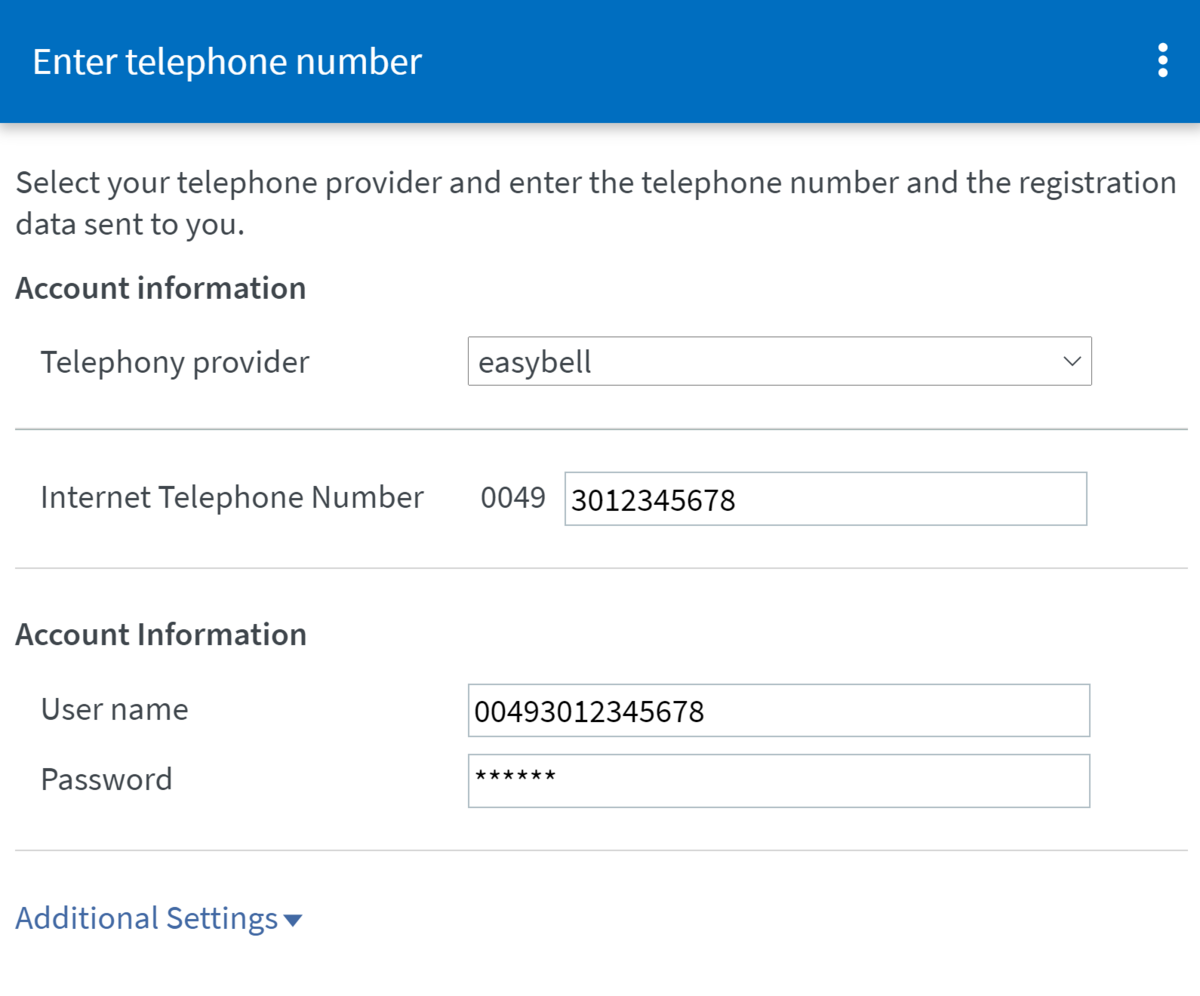
In the next menu, please select the following:
Telephony provider: easybell
Internet telephone number: Your phone number in international format (0049 (already specified) + area code without zero + phone number)
User name: Your phone number in international format (0049 + area code without zero + phone number)
Password: Your SIP password (you can find this in the customer portal under Functions/Manage phone numbers)

You'll find your sip login data in my.easybell. Go to “Telephone line” and click the relevant phone number to access its details.
Registrar: voip.easybell.de
If you have difficulty finding the details, please read “Where can I find my SIP access details?”.
When setting up the FRITZ!Box for the first time, you'll have to enter your area code here with the leading 0, e.g. 030 for Berlin.
Click on “Further settings”
4. Additional settings for the connection
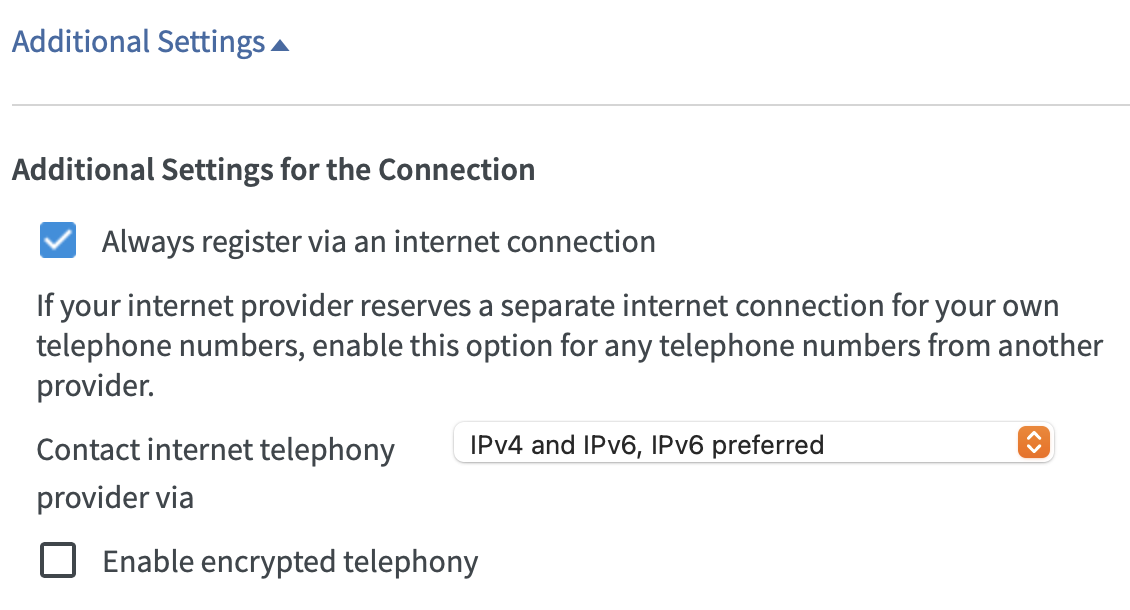
Please fill in "Additional Settings" as follows:
Always register via an internet connection: Yes
Contact internet telephony provider via: IPv4 and IPv6, IPv6 preferred (You will see this option only if your Internet connection supports IPv6.)
Enable encrypted telephony: If you wish, you can encrypt the telephony here. Read further information in our article on encrypted telephony.
Please click "Next" when you are done
5. Finalize setup
On the following page you can review your settings. Click "Next" to complete the setup.
If everything has been entered correctly and your router is connected to the Internet, you should now be able to make calls. If this is your first set up number, all calls in the future will be made via this number. Please remember to configure your telephones according to your wishes in the menu item Telephony > Telephony Devices.
Instructions for older firmwares
Here you can find our instructions in german for devices with older firmware:
Fritz!OS 6.0 and higher (for Fritz!Box 7270 v3, 7312, 7360,7390 and other models)
Fritz!OS 6.83 and higher (for Fritz!Box 7272, 7360, 7390 and other models)