

Can I use an ISDN telephone system with a VoIP connection?
Or would it be better to change trains?

ISDN was long considered the standard for high-quality business telephony. However, the technology is outdated and has been replaced for years by Voice over IP (VoIP), also known as All-IP or NGN. Deutsche Telekom has announced that it will migrate all existing ISDN lines to All-IP before the end of this year. The majority of users already make calls via VoIP.
The transition from ISDN to All-IP affects both ISDN multi-device connections and ISDN system connections. So what should you do with your ISDN telecommunications system? Can you continuetouse it, or should you switch to VoIP instead? We’ll help you make the decision!
What happens to your ISDN phone system after you switch to VoIP?
Since the SIP phone system connection can replace traditional ISDN phone lines, such as primary multiplex (PMX) lines, you no longer need a physical phone line. Calls are simply routed through your broadband connection. As a result, ISDN devices can no longer be used as-is.
But don’t worry—you can continue to use your current ISDN system. To ensure this goes smoothly, there are simple options available, which we’d like to outline for you below.
ISDN Phone System and Router
For example, thanks to modern routers like the latest FRITZ!Box, you can continue to use your ISDN phone system. To do this, the model must have a telephone interface (also known as an S0 connection). It must also support VoIP. You can quickly and easily find out whether a router is “VoIP-capable” using our Router Check! If you want to continue using a block of phone numbers from an ISDN system connection, the router must also support SIP trunks.
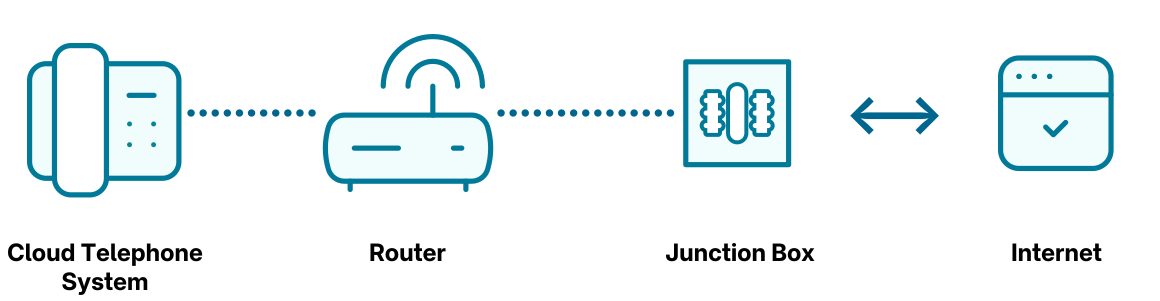
If a router supports Internet telephony and has an S0 connection, it is possible to connect the ISDN PBX to the router.
Side Note: How to Connect Your ISDN Phone System Correctly
Making the switch is quite simple; you don’t need a technician to set it up for you. You can do it yourself—and we’ll explain how:
- Since IP-based telephony no longer requires signal separation between the telephone and IP networks, you no longer need an ISDN NTBA (i.e., a network termination unit for the ISDN basic line) or a splitter. You can remove both and use a VoIP-capable router (such as FRITZ!Box models) instead.
- The same applies to the cable running from the telephone jack to the DSL splitter. Please remove this cable.
- The middle jack on the TAE telephone jack can now be connected to a modem or the router (if the modem is integrated into the router).
If you choose a router, connect it to the TAE jack using a suitable cable. - All done! The router or other modem device is now connected to the TAE jack via a plug and adapter.
- You can now connect the ISDN phone system to the router’s S0 interface.
ISDN Phone System and Media Gateways
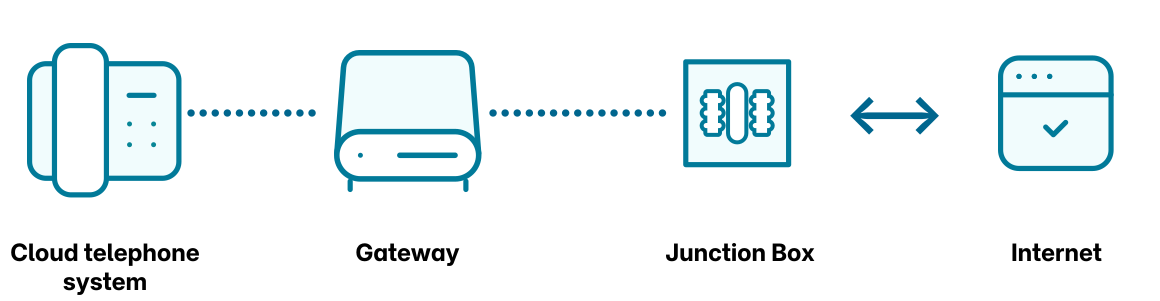
Media gateways—also known as VoIP gateways—are ideal as digital voice converters for analog systems. The term “voice converter” comes from the fact that these gateways convert the voice signaling to be transmitted from ISDN to SIP and vice versa. This allows you to connect a “non-SIP-compatible” PBX to theAll-IP network, use SIP trunks, and make calls easily via VoIP. Media gateways are frequently used in professional settings and are particularly suitable when more than two ISDN channels need to be replaced. A maximum of two calls can be made simultaneously via an S0 port. Many media gateways therefore have multiple S0 ports.
VoIP Expansion Modules for ISDN Systems
In general, ISDNphonesystems can be upgraded by installing expansion modules that provide additional functions and connection options. These expansion modules help you prepare your ISDN phone system for All-IP use. However, they are manufacturer-specific. Depending on the manufacturer and model, there may be differences, and not all modules can be used with all systems. Therefore, it is best to contact your ISDN phone system manufacturer.
Our recommendation: Make calls using easybell's SIP trunks and cloud PBX
SIP Trunks
We offer flexible SIP trunks at competitive rates. The concept is very simple: You no longer make calls via an ISDN line but through your Internet connection. The SIP trunks are hosted in an IP phone system at your location or in the cloud. This allows you to set up new phone numbers or continue using your existing ones. Unlike ISDN, you can use a SIP trunk anywhere in the world—all you need is a broadband connection. This means, for example, that employees can be reached at their office number even when they’re on a business trip or workingfromhome. This gives you and your company flexibility and independence, allowing you to fully take advantage of the cost-saving potential of a trunk.
If you’re interested in switching to SIP trunks, we recommend the following:
Cloud-Based PBX
Another option—or an additional one—is to consider using a cloud-based phone system (hosted PBX).
It offers long-term performance and is therefore clearly an investment in the future. Since it is a virtual phone system, it is not location-dependent and requires no additional maintenance or servicing costs. It is also flexible and intuitive to use on your own.
Additional benefits for you:
- Availability: Phone numbers with no additional monthly costs, up to 50 external calls and an unlimited number of internal calls
- Global usability: You can use a cloud-based phone system anywhere in the world. This makes it possible to seamlessly integrate employees at different locations and those working from home.
- Expanded Feature Set: Our cloud-based phone system offers features that were not possible with ISDN. All of these features can be controlled via a user-friendly web interface.
- Regular Updates and Feature Enhancements: We are continuously developing the cloud-based phone system. New features are automatically made available to you. And, of course, we always ensure that your phone system is up to date with the latest security standards.
- Security: The phone system is hosted on servers in Germany.
- Freedom: No minimum contract term, fair contract terms, 30-day free trial*
So much for the theory. In practice, here’s what using the system might look like for you:
The Cloud PBX in 100 Seconds
Bottom line: You don't have to get rid of your ISDN phone system—but you can!
This means that IP telephony is also possible via a standard ISDN phone system. If you do decide to go with a cloud-based phone system, we recommend the easybell Cloud Phone System, which not only helps you save money but also allows you to make secure calls and take advantage of additional features.