

Itemized bill – setup and use
An itemized bill is a detailed overview of telephone calls made. Only calls that incur costs or are relevant for billing are recorded.
For data protection reasons, Easybell does not send a list of your individual connections with the invoice. If you have activated the itemized bill, you can view the data in the Easybell customer portal.
Easybell does not provide the EVN automatically—it must be actively activated by the customer.
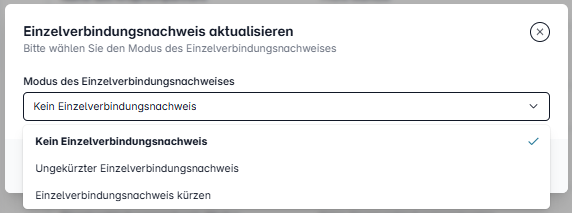
How can I activate itemized bills and what options are available?
The itemized bill can be activated either directly at the end of the order process or later in my.easybell.
To do this, go to your in the left bottom and open your "Account settings". Under "Billing & Payment", you can click on "Update mode" next to "Itemized call statement". You now have the following options:
- Full itemized call statement: Displays all relevant connection data including destination numbers.
- Shortened itemized call statement: Contains all connection data, but without complete destination numbers.
- No itemized call statement: Individual connections are not stored or displayed.
Bills and itemized statements at a glance
You can also find an overview of your itemized bills in your my.easybell account under "Bills & itemized bills".
You will now see a tabular list of all available invoices. The following information is displayed for each invoice:
- Billing date
- Amount (positive or negative, e.g., for credit notes)
- Invoice ID
- Direct download of the invoice
- Direct download of the e-invoice
- Payment status (e.g., "Paid")
- Download of itemized bill, if available
You can use the download links to download both the invoice and, if available, the corresponding itemized bill directly as a PDF file.
Which connections are displayed in itemized bills?
In accordance with legal requirements, in particular Section 11 (1) TDDDG, only connections subject to charges or relevant to charges are listed in the itemized bills. This means:
These connections appear in the itemized bills:
- Charged calls, unless there is a legal provision to the contrary (e.g., Section 11 (5) TDDDG).
- Calls made using a minute package/fair flat rate, so that it is possible to track when the minute allowance has been exceeded.
These connections do not appear in the itemized bills:
- Free calls that are covered by a regular telephone flat rate.
- Calls to toll-free service numbers.
- Intra-network calls between Easybell customers (Onnet calls).
If a complete list of all calls is required, the call list in the customer portal can be used instead.
What is the difference between itemized bills and call list?
While itemized bills only displays calls that are subject to charges and relevant for billing, the call list shows all calls made, regardless of whether they were subject to charges or not.
The call list is available to all customers in the Easybell customer portal and can be activated there. Click here for instructions: Activate and use the call list.